Handle wholesaler consols in CargoWise
Updated
If you run consols for other forwarders, one master bill carries many house bills, and they reach you on different emails from different senders. With wholesaler handling switched on, TaluxIQ files each pre-alert against the CargoWise job or consol that already holds it, holds house bills that arrive before their master bill, and files co-loader manifests where they belong. This article covers the setup, what TaluxIQ does with each kind of email, and the screens you use.
Set up
Talux switches wholesaler handling on for your workspace. Before it does, work through these with your TaluxIQ contact:
- Ask for wholesaler handling. Talux turns it on for your workspace. Co-loader manifests and Awaiting consol then appear under Imports.
- Check your company name. TaluxIQ knows a parent bill is meant for you when its consignee or delivery agent matches the company name Talux holds for you. If co-loaders print your name differently, tell your TaluxIQ contact.
- Connect CargoWise. TaluxIQ can only find a consol that already exists in CargoWise once your CargoWise integration is sending to Talux. See CargoWise integration setup.
- Set up your co-loaders in CargoWise. Each co-loader you consolidate for should be an organisation in CargoWise with Forwarder/Agent ticked. TaluxIQ uses that to type their house bills as co-loads.
- Map the parent bill custom fields. If you want the parent or switch bill number and its release type in CargoWise, Talux maps them to your CargoWise custom fields. They then show under Custom fields on each house bill.
Co-loader manifests go to CargoWise as MAN (Cargo Manifest) by default. If you file them under another code, tell your TaluxIQ contact.
What TaluxIQ does with each email
A pre-alert with a master bill
TaluxIQ places it by the master bill number. If no job in TaluxIQ holds that master bill but a consol in CargoWise does, TaluxIQ creates the job under that consol, so sending it updates the consol instead of making a duplicate. The consol's master bill, vessel, voyage, ports and carrier then come from CargoWise, not the document. If nothing holds it, TaluxIQ creates a new job.
House bills with no master bill
TaluxIQ looks for a job with the same master bill number, then the same container, then a consol in CargoWise with that master bill or container. A match counts only when exactly one job or consol fits; otherwise TaluxIQ creates a new job rather than guess. When it does match, the email adds or updates only its own house bills. The consol's master bill, vessel, ports and dates, and the other house bills, stay as they are.
House bills under a parent bill, before the master bill
A co-loader often sends its house bills under its own parent bill before the master bill exists. When the parent bill names you as delivery agent, TaluxIQ adds the house bills to the consol that already holds that parent bill, or, if none does, holds them on Awaiting consol. The email shows Awaiting consol on Job registration.
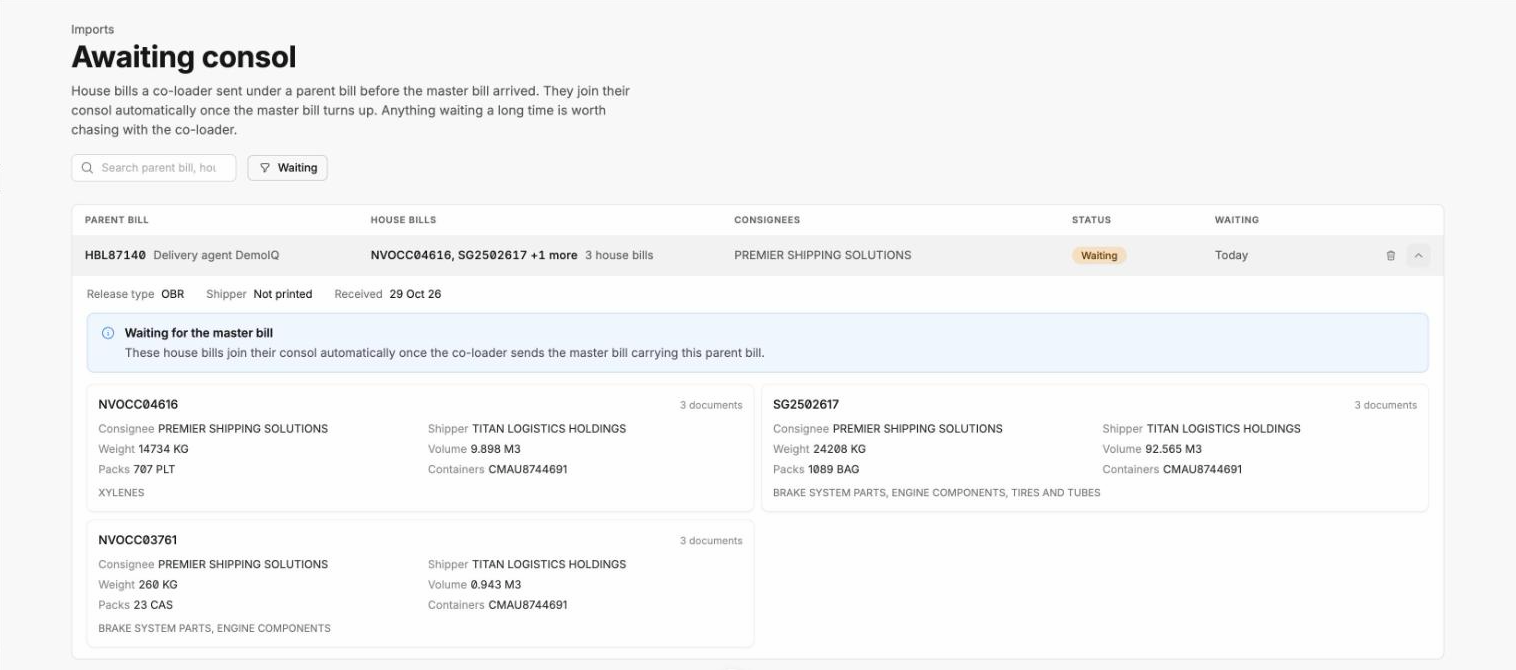
When the master bill arrives carrying that parent bill, the held house bills join its job by themselves. The row moves to On a job with a link to the consol, and the waiting email is marked done.
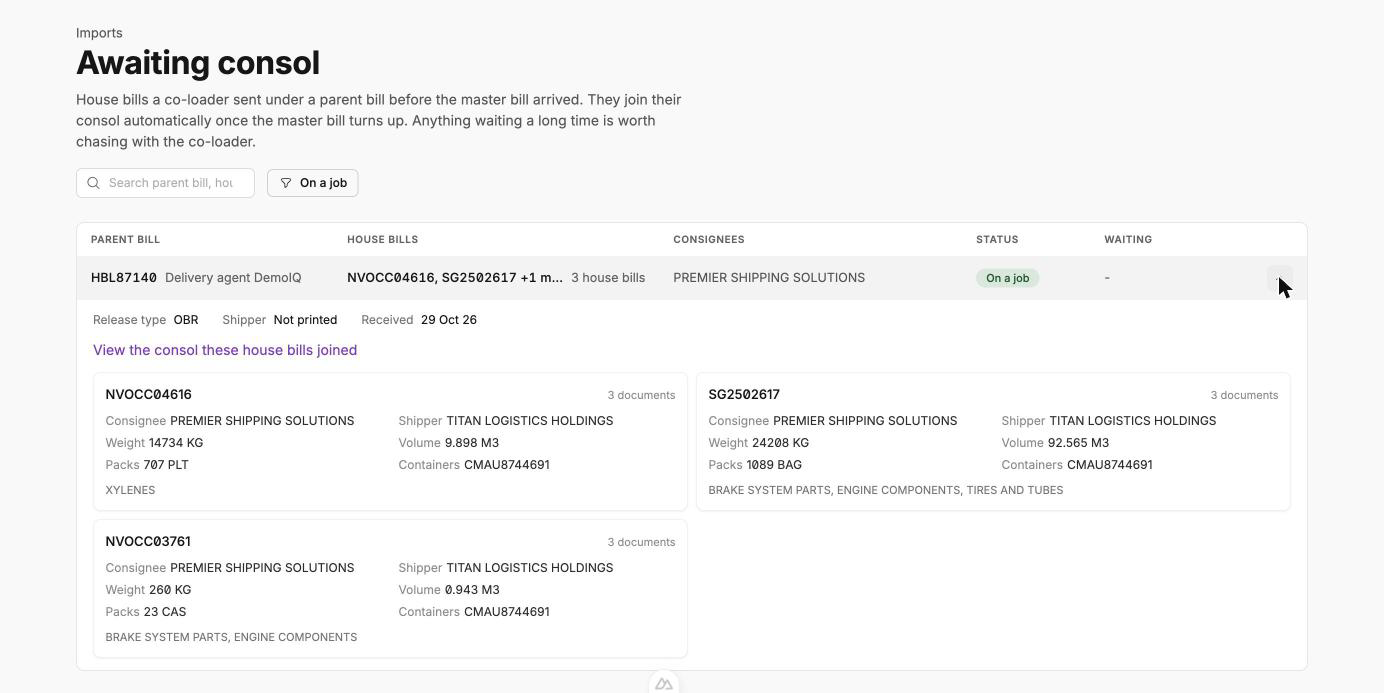
To stop waiting for a master bill, select the bin icon on the row (Discard these house bills), then Discard house bills. They will not join the consol if the master bill arrives later. The email they came on is unchanged, so the co-loader can resend the pre-alert.
Switch bills
A switch bill is one consigned TO ORDER, TO THE HOLDER OF or RELEASE AGAINST. TaluxIQ pairs it with the real house bill by weight and volume, records its number and release type against that house bill, and moves its documents across. It does not become a shipment of its own.
A co-loader manifest on its own
A manifest a co-loader sends for its cargo in your consol never creates a job. TaluxIQ finds the job by master bill, then container, and files the manifest against the house bill consigned to that co-loader, or against the consol when no house bill is. If the manifest disagrees with your job, the email shows Manifest mismatch. See Resolve a manifest mismatch.
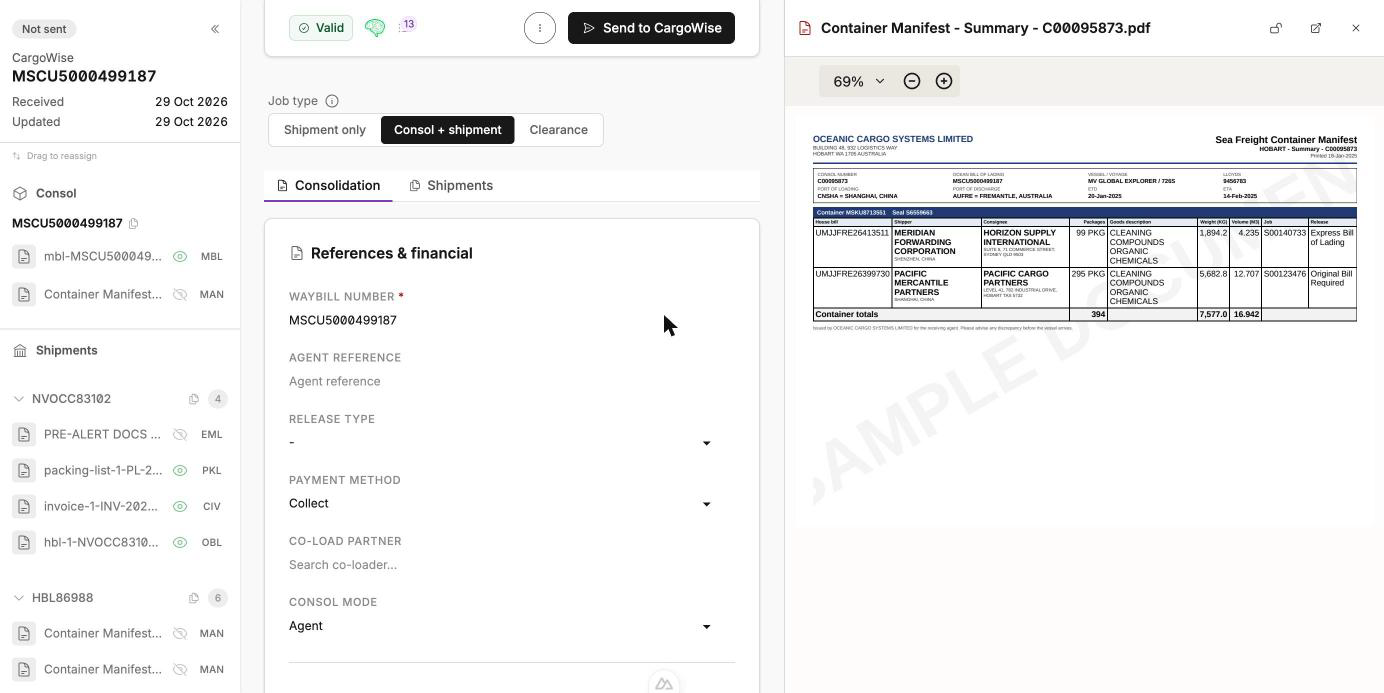
If CargoWise already holds the job, the manifest is sent to it straight away as an eDoc. If not, it waits on the job.
What goes on each house bill
- Shipment Type: a house bill consigned to a forwarder or agent in your CargoWise organisations, or to a consignee TaluxIQ cannot match, is Co-Load Master (CLD). Any other is Standard House (STD). You can change it on the house bill.
- Departure date: the house bill's issue date. Tracking does not overwrite it.
- Transport legs: a transhipped house bill carries only its leg from place of receipt to the consol's port of loading. Any other shows Transport route follows the consol.
- Containers: when the email carries the consol manifest, each house bill takes its containers from it.
- Container mode: an FCL master bill with LCL house bills goes to CargoWise as a GRP consol with LCL house bills.
- Release type: when the bill has no release stamp, one or more originals means OBR, none means EBL.
- Overseas agent: each house bill takes the consol's sending forwarder, except on clearance jobs.
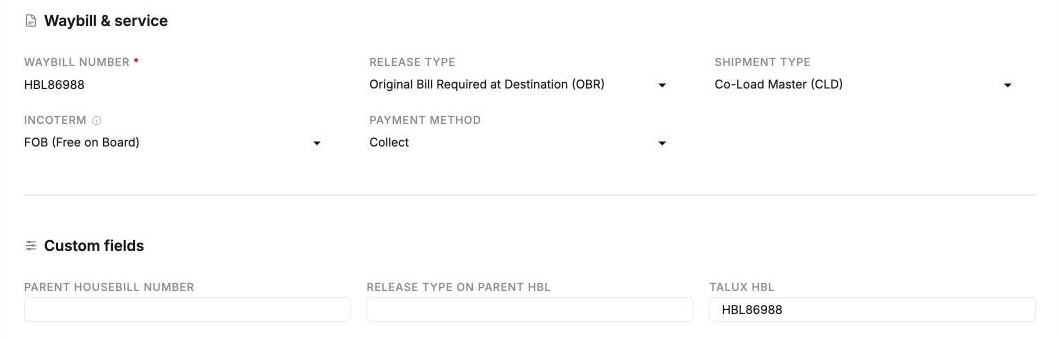
Before you send, the job checks every house bill container has a number and each house voyage is no more than 10 characters.
Sending to CargoWise
A new job waits as Not sent until you select Send to CargoWise. When a later email updates a job CargoWise already has, the job shows New info: review it and send again. TaluxIQ never re-sends job details on its own; only new documents go automatically, to a job CargoWise already holds.
Resolve a manifest mismatch
Co-loader manifests under Imports lists every manifest a co-loader sent, with its issuing company, ocean bill, job and outcome.
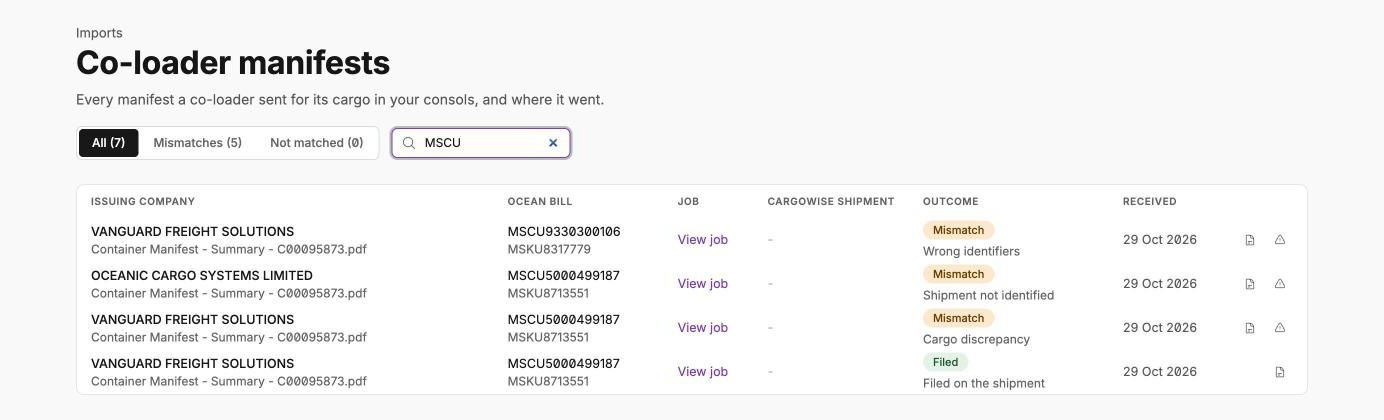
- Select the Mismatches view. Each row is Wrong identifiers, Shipment not identified or Cargo discrepancy.
- Select View details. Differences to raise with the issuer shows each field on the manifest and on your job.
- Select Copy body and copy the subject to email the issuing company for a corrected manifest.
- When the corrected manifest has arrived, or you have fixed the shipment, select Mark resolved. Reopen brings it back.
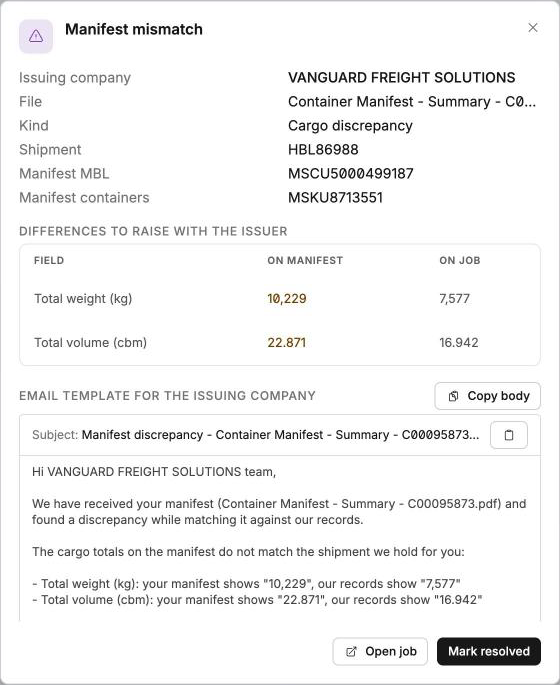
A manifest with Wrong identifiers is held back from the job until the corrected one arrives. The other kinds are filed and recorded.
See what happened to an email
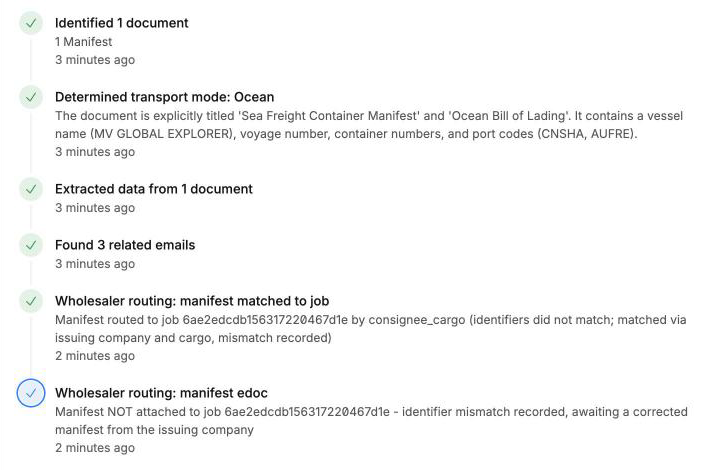
On Job registration, select More on the email, then the Timeline tab. Wholesaler steps start Wholesaler routing:, for example matched existing job, matched TMS consol, unmatched documents or manifest matched to job. An email with a mismatch also shows Review mismatch on its Details tab.
Troubleshooting
- A pre-alert made a new job instead of joining the consol. On the email's Timeline, Wholesaler routing: unmatched documents means no job or CargoWise consol had that master bill or container, or more than one did. Check the numbers on the existing job match the document.
- The vessel or ports on a new job differ from the document. The job was created under a consol already in CargoWise, which takes priority. Correct it in CargoWise if the document is right.
- House bills have been on Awaiting consol a long time. The Waiting column counts the days. Chase the co-loader for the master bill.
- House bills under a parent bill registered as a normal job. The parent bill did not name you as delivery agent, or names you differently. Check the company name Talux holds for you.
- You do not see Co-loader manifests or Awaiting consol. Ask your TaluxIQ contact to check wholesaler handling is on for your workspace.